Setting up your own AI infrastructure: the 5-layer stack for GDPR-proof AI
 Mohammad Moghtader
Mohammad Moghtader — CTO of Virtual Computing
Over the past eighteen months, "using AI in your business" has shifted from an experiment into a production question. And with that shift come questions you could still ignore during the hype phase: where does our data live, what happens to the prompts, can we switch vendor later, and what if OpenAI doubles its prices?
For more and more Dutch SMB teams — especially in healthcare, legal and finance — this leads to the same conclusion: an in-house AI infrastructure. Not to replace OpenAI or Anthropic, but to take control and data back. In this article we describe the stack we roll out for this, in five concrete building blocks.
Why an in-house AI stack?
Three reasons, in order of how often they come up in our calls:
1. Data sovereignty. Your prompts and business data stay under Dutch law. No training data for an American vendor, no surprises on subpoenas or policy changes across the ocean. For healthcare and legal customers this is often not optional — it's required.
2. Cost control. Per-token credit models scale unpredictably. A SaaS tool that costs €50 per user/month today may be €120 next year — nobody knows. With an in-house stack you pay a fixed monthly price for the infrastructure, plus only the LLM calls you actually use (and you can switch vendors without breaking the pipeline).
3. Avoiding lock-in. Today OpenAI is dominant, tomorrow Anthropic. Or it's Mistral, or Llama 4. Whoever is locked into one LLM vendor via their SaaS tool can't move with the market. An in-house stack is vendor-agnostic.
A fair downside: an in-house stack asks for deliberate choices. You get control, but you also have to make the decisions the SaaS tool made for you. That's why we work with a fixed 5-layer architecture that fits 90% of cases.
The five layers
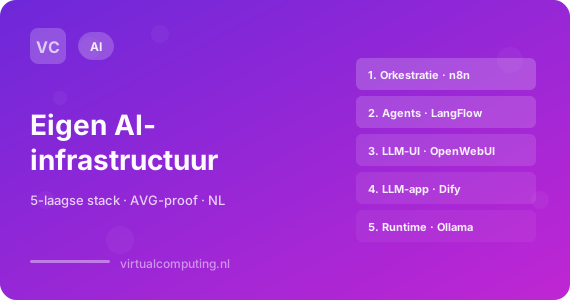
A production AI application has typically five components. At Virtual Computing we run each layer as a separate Docker container on our managed hosting so they can be scaled and updated independently.
Layer 1 — Orchestration
What it does: wires workflows together. Combines LLM calls with databases, email, CRM, Teams messages and anything else.
Tools: n8n is the open-source standard, Activepieces is a simpler alternative for business teams.
Why on your own infra: your orchestration has access to ALL your API keys (CRM, invoicing, email) and all data flowing through your workflows. Not a place for a SaaS middle layer — and definitely not for a tool like Zapier where every per-task credit stacks up as workflows grow.
We've written a separate guide on this: n8n hosting in the Netherlands.
Layer 2 — Agent frameworks
What it does: visually build agents and LLM flows — drag-and-drop on top of LangChain. Ideal for RAG pipelines (retrieval-augmented generation), multi-step reasoning and tool use.
Tools: LangFlow for developer-leaning teams, Flowise for business-leaning teams. Dify is the heavier option that also includes deployment and versioning.
Why on your own infra: your agents often work on sensitive company documents. With a SaaS tool you don't know which chunks land where, with an own runtime you do.
Layer 3 — LLM interface
What it does: a ChatGPT-like web interface on your own models. Per team, per project or per customer. Works with OpenAI, Anthropic, Mistral and local models via Ollama.
Tools: OpenWebUI is the clear open-source winner here. Works directly with cloud APIs AND local Ollama runtimes, supports role-based access and prompt libraries.
Why on your own infra: your staff want ChatGPT-like tooling, but you want to prevent them typing sensitive info into someone else's cloud. An own OpenWebUI with your API key delivers the same UX, with audit log and data control.
Layer 4 — LLM-app platform
What it does: build production LLM applications — knowledge bots, customer-service AI, internal assistants — with versioning, datasets and evaluation.
Tools: Dify is a complete platform product covering both agents and deployment. For lighter use cases a LangFlow or Flowise flow is often enough.
Why on your own infra: a knowledge bot indexes your documents. Those documents shouldn't cross a border gate.
Layer 5 — Runtime + vector database (optional)
What it does: local LLM runtime (for sensitive workloads or cost control) and a vector database for your RAG pipeline.
Tools: Ollama for the local runtime (Llama 3, Mistral, Qwen, Phi), pgvector as a simple PostgreSQL extension, or Qdrant/Weaviate for heavier workloads.
Why on your own infra: this is the layer where most data sovereignty lives. A document you embed via local Ollama and store in your own Qdrant never leaves your infrastructure.
GPU question: Ollama runs on CPU for small models (Llama 3 8B is usable), but for production most teams want a dedicated GPU (NVIDIA A4000 or higher). We offer this on request.
Four examples of what you can build
RAG over company documents
Search your SharePoint, contracts or helpdesk history with LLMs without source documents leaving your infrastructure. LangFlow handles retrieval, Ollama the embeddings, Qdrant the vector storage. Four containers, no external dependencies except your chosen LLM (and even that can be local).
Customer-service AI with human escalation
n8n routes incoming tickets, Dify drives the LLM conversation, Chatwoot handles live chat with human escalation. One pipeline, three containers, you keep the transcript. No Intercom subscription at €300/mo, no data at an American party.
Private ChatGPT for your team
OpenWebUI as chat interface on top of your own API keys. Everyone has access to GPT-4 or Claude or a local model — without prompts leaking to third parties. With your own rate limits and audit log.
Automated reports and summaries
n8n pulls data from your systems, an LLM summarises, n8n delivers the report via email or Teams. Not an "AI feature" inside a SaaS, but your own pipeline you can adjust whenever you want.
GDPR and what it means
An in-house stack doesn't automatically make GDPR compliance watertight — but it makes it achievable. Three things we always walk through:
- Processing register. What do you process where? At which LLM vendor does which data land? Document per workflow.
- DPIA for sensitive data. For healthcare and legal data a Data Protection Impact Assessment is often required. We help with that, and the containerized setup makes the scope clearly demarcated.
- Retention policies. How long does a conversation or prompt stay in your tool? Set retention policies on both the orchestration layer (n8n) and the interface layer (OpenWebUI).
Also read our article on the NIS2 directive and SMBs if your organisation will fall under that legislation — an in-house AI stack helps tremendously with the evidence trail.
Practical roll-out order
In practice we rarely build this stack all at once. Our recommended order:
- Start with n8n as the orchestration layer. One container, immediate value by migrating existing workflows from Zapier or Make.
- Add OpenWebUI as soon as the team wants to do more with LLMs than via Copilot or ChatGPT subscriptions.
- Build your first RAG pipeline with LangFlow or Flowise as soon as a concrete use case appears (knowledge bot, customer service).
- Add Dify if you want to build production LLM apps with versioning and evaluation.
- Consider Ollama + vector DB only when data sensitivity or cost control justifies it.
Not every step is relevant for every team. An accountancy firm needs something different than a production company.
What it costs
For a complete 5-layer stack without dedicated GPU you're looking at €130 to €200 per month at Virtual Computing. With dedicated GPU for local Ollama models that starts around €350/mo.
A fraction of what a per-user SaaS stack ($30-50 per user/month × 25 users = €750-1,250/mo) costs — and without your data at third parties.
Per individual container prices start from €29/month. See current options on our AI infrastructure page.
Common questions
Can we use Azure OpenAI alongside this? Yes. n8n and Dify have native integrations with Azure OpenAI, AWS Bedrock and Google Vertex AI. Many customers use Azure OpenAI for compliance-driven workloads and local Ollama for experiments.
Does this work with our Microsoft 365 tenant? Yes. n8n talks to Microsoft Graph (SharePoint, OneDrive, Teams) via OAuth. RAG over your SharePoint library is a common first use case.
Do I need a GPU? Not for n8n, LangFlow, Flowise, Dify and OpenWebUI. Yes if you want to run local models via Ollama. For most SMB teams that can wait until first workflows are in production.
Isn't this a lot of work to set up? Our 5 containers can be rolled out within a working day. The substantive configuration — designing workflows, writing prompts, building RAG pipelines — takes more time. That's where our AI advisors help via Custom AI.
Conclusion
An in-house AI infrastructure on Dutch Docker hosting gives you three things a SaaS stack doesn't: data sovereignty, cost control and vendor flexibility. The five building blocks — orchestration, agents, LLM interface, LLM-app platform and runtime — are open-source and proven, and we've now rolled them out for dozens of SMB teams.
The right question isn't "should I do this?", but "which layers do I need when?". Almost everyone starts at layer 1 (n8n) and grows from there.
Want a complete AI stack set up with advice on model choice and data strategy? See the AI infrastructure page, check which standalone hosted apps run on our infrastructure, or book an AI strategy call — call 085 013 4500.
Written by
Related articles
Work more efficiently with Microsoft Copilot
Microsoft Copilot makes your daily work routine more efficient. This smart AI assistant from Microsoft helps you with tasks in Word, Excel, Teams, and more.
AIHow AI transforms online working
The modern workplace feels logical today. Working wherever suits you. Collaborating in the cloud. Always having access to information. But anyone who thinks this happened by itself underestimates how much has been tried along the way.
AIIn the AI Garage: how we built Alex, our digital colleague
On the Dutch podcast Fontys AI Garage, Mohammad Moghtader and Luc Tortike explain how we built Alex, our digital employee who takes over routine tasks. What Alex does, how we keep it safe and why it didn't stay a pilot. With the full episode included.